TechniQuip DVPG Digital Video Crosshair Generator - Dual Camera

$1,850.00
(No reviews yet)
SKU:
DVPG-KIT
Availability:
7 - 10 Business Days
Shipping:
Calculated at Checkout

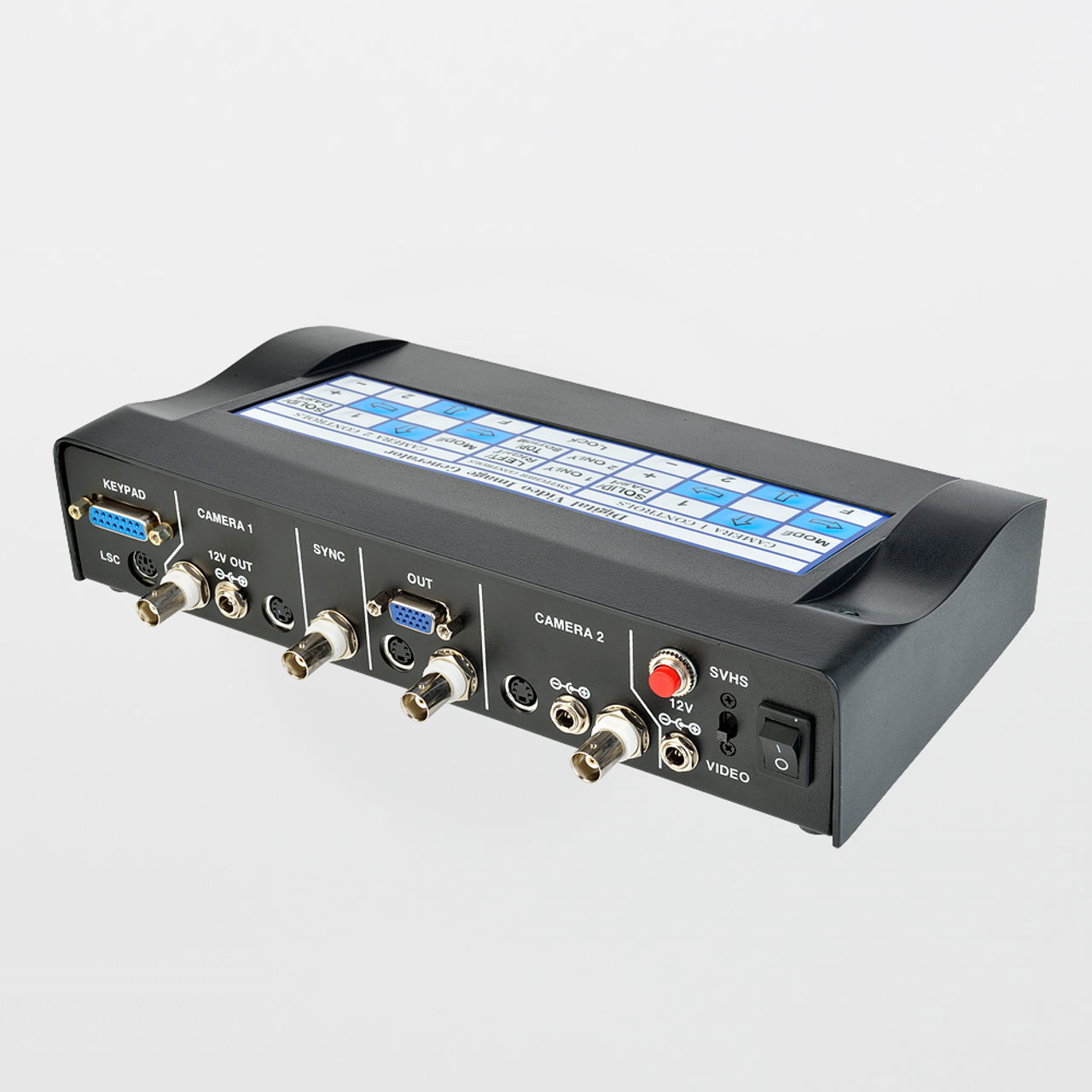
TechniQuip DVPG Digital Video Crosshair Generator (Dual Camera)

The TechniQuip DVPG is a digital video reticle (crosshair) generator designed for dual-camera video inspection environments. It overlays adjustable reference patterns on a live video feed so operators can perform repeatable alignment, positioning, and visual verification when features are too small to judge consistently by eye. In two-camera benches, the DVPG supports standardized targeting across camera viewpoints and reduces “re-centering drift” between stations.

Why teams specify DVPG: It delivers stable, repeatable on-screen reticles (crosshair and geometry patterns) with Hold/Lockout so validated overlays do not move due to accidental key presses during production use.

Specifications:
  • Model: DVPG
  • Application: Digital reticle/crosshair overlay for dual camera video inspection
  • Reticle patterns: Multiple selectable patterns (crosshair variants and geometry targets)
  • Line styles: solid/dashed, black/white, plus “no lines” (blank video)
  • Video formats: Composite (BNC) and S-Video (4-pin mini-DIN) — do not mix input/output formats
  • Video standards: NTSC / PAL (also commonly referenced as EIA / CCIR)
  • Key functions: Hold/lockout, reticle position memory/settings retention, phase-locked overlay behavior
  • Power: 12 VDC input (power supply typically supplied with unit)
  • Typical uses: microscopy alignment, metrology reference, dual-view inspection benches, fixture verification
Where DVPG Fits in Dual-Camera Inspection

Dual-camera benches are often used when a single viewpoint is not sufficient—examples include a top view + oblique view, two magnification steps, or two stations that must target the same feature consistently. A digital reticle generator acts as an on-screen “reference fixture” so operators can align features to the same reference points and reduce interpretation drift between cameras.

System note: The DVPG is inserted in series between camera video outputs and the monitor path. Keep formats consistent end-to-end: Composite → Composite or S-Video → S-Video.

In cleanroom or controlled environments, reticle-based targeting also reduces excessive part handling and repeated “hunt and center” movements that can increase contamination risk at the workstation.

DVPG Features:
  • Digital reticle overlays for repeatable alignment and verification
  • Dual-camera support for benches with two viewpoints or stations
  • Hold / lockout mode prevents accidental reticle movement during production use
  • Reticle memory retains settings after power cycles, reducing re-setup time
  • Composite or S-Video support for common legacy video microscopy chains
DVPG Benefits:
  • Repeatable multi-view inspection: standardizes targeting across two cameras
  • Faster setup and training: operators align to the same overlay reference instead of “eyeballing” position
  • Reduced inspection variance: fewer disagreements driven by framing differences
  • More consistent documentation: supports before/after alignment for rework, training, and investigations
Common Applications:
  • Dual-camera microscope benches (two viewpoints or magnification steps)
  • Fixture verification and alignment workflows
  • PCB / component inspection requiring repeatable targeting
  • Substrate/wafer inspection where consistent framing improves decision quality
  • Production QA/QC stations using a monitor as the authoritative inspection view
Recommended Optical Cleaning Consumables (SOSCleanroom)

Reticles improve targeting, but image quality still depends on clean optics and a clean camera path. Use optical-grade, low-lint tools—avoid cotton swabs and general-purpose tissues.

Notes: Use a consistent video format end-to-end (Composite-to-Composite or S-Video-to-S-Video). Avoid mixing formats or connecting multiple source formats simultaneously. Follow manufacturer instructions and facility SOPs.

Product page updated: Jan. 21, 2026 (SOS Technical Staff)

© 2026 SOS Supply. All rights reserved.

The Technical Vault
By SOSCleanroom
Last reviewed: Jan. 21, 2026 | Audience: microscopy users, QA/QC, manufacturing engineering, metrology, cleanroom operations
Dual-Camera Video Inspection: How Reticle Overlays Reduce Variance and Speed Up Setup
TechniQuip DVPG — installation discipline, lockout control, and SOP-ready targeting methods for two-camera benches
Dual-view targeting Setup control Repeatable QC
The one-paragraph answer

Dual-camera benches introduce a predictable problem: each camera creates its own “reference reality,” and operators drift in how they center and frame the feature. The TechniQuip DVPG overlays stable digital reticles on the video feed so both viewpoints can be aligned to consistent reference geometry. With Hold/Lockout and retained settings, the DVPG supports production-ready inspection discipline: set the reticle, verify targeting, lock it, and keep outcomes consistent across users and shifts.

Operational problems the DVPG is solving
  • Two-view drift: the same feature is framed differently between camera views, changing perceived defect severity.
  • Slow changeovers: operators lose time re-centering after camera swaps or shift changes.
  • Training inconsistency: trainees struggle to match the same view as experienced inspectors.
  • Documentation mismatch: images cannot be compared cleanly because the feature is not in the same location within the frame.
Installation discipline (prevents damage and troubleshooting loops)

The DVPG is installed in the video chain. The most important reliability rule is format consistency: choose Composite or S-Video and keep input/output consistent for each camera path.

Critical caution: Avoid mixing formats (e.g., S-Video in → Composite out) and do not connect multiple format sources simultaneously. These are common causes of equipment damage in legacy video systems.

Dual-camera SOP checklist (template-style)
  1. Identify each camera path (Camera A / Camera B) and label cables and inputs.
  2. Choose a single format per path (Composite or S-Video) and keep it consistent end-to-end.
  3. Insert DVPG in series between each camera and the monitor path as specified by the system design.
  4. Set the reticle pattern appropriate to the task (crosshair vs box/circle target).
  5. Align the reticle to a known fixture point or calibration target (station standard).
  6. Engage Hold/Lockout once the validated overlay position is achieved.
  7. Verify at shift start: reticle pattern, position, and line style (solid/dashed, black/white) match the SOP.
How QA/QC teams use reticles in dual-camera workflows
Two-view targeting method (recommended)
  • Define “primary view”: choose the camera view used for disposition calls, and standardize it.
  • Define “support view”: use the second camera for edge relief, angle-dependent visibility, or confirmation.
  • Standardize reference geometry: the same feature should land on the same reticle element (center, box edge, circle boundary) each time.
  • Lock the validated state: once aligned, enable Hold/Lockout and treat it as a controlled configuration.

The key is to treat the reticle overlay as part of the inspection method—not a convenience feature. Document which pattern is used for each product family, and record lockout expectations in the SOP.

Optics cleanliness (reticles do not fix low-contrast images)

If targeting becomes inconsistent, confirm optics cleanliness and illumination stability first. Haze films and fingerprints reduce contrast and change the perceived “edge” of features—especially on glossy parts.

Optical cleaning best practice (template-style)
  1. Remove loose particles before wiping (avoid dragging grit across coatings).
  2. Use a fresh, low-lint optical swab/wiper; lightly dampen if solvent is permitted by SOP.
  3. Wipe gently in one direction; avoid heavy pressure and repeated scrubbing.
  4. Replace cleaning media frequently; do not reuse loaded swabs.
  5. Cover microscope/camera path when idle to reduce airborne deposition.
Source basis
  • SOSCleanroom product listing context (dual-camera positioning and application intent).
  • Manufacturer documentation for DVPG (overlay capability, lockout/memory functions, and installation cautions).
  • Common microscopy/video inspection practices (station standardization, operator repeatability, optics hygiene).
Compliance note: This Technical Vault article is provided for educational support. Always follow facility SOPs and the manufacturer’s published instructions for installation, power, and handling.
Document control: Rev. Jan. 21, 2026 (SOS Technical Staff)
© 2026 SOS Supply. All rights reserved.