Texwipe TX7102C ClipperMop Cleanroom Replacement Tether Clips and Screws (Refills)

$207.56
(No reviews yet)
SKU:
TX7102C CASE
Availability:
10 - 14 Business Days
Shipping:
Calculated at Checkout
Quantity Option (Case):
80 Clips and 40 Screws Per Case (20 Bags of 4 Clips and 2 Screws)
Type:
Dry Mop
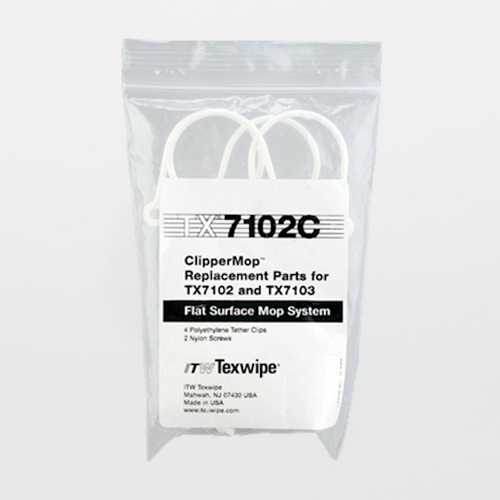
Texwipe TX7102C ClipperMop™ Replacement Tether Clips and Screws (Refills) — Polyethylene Clips + Nylon Screws
TX7102C is the replacement clip-and-screw kit that keeps the Texwipe ClipperMop™ wiper-attachment system working the way it was designed: secure a fresh cleanroom wiper to the mop head quickly, then release and dispose of the spent wiper without generating avoidable fibers, particles, or “tool-made” debris. In critical environments, these small hardware pieces matter because worn clips, missing screws, or improvised fasteners can turn a validated mopping method into a contamination risk.

For over 35 years, SOS and Texwipe have been close partners, and SOSCleanroom is the authorized Master Distributor of ITW Texwipe for the United States market. That relationship matters for cleanroom mopping programs: it supports continuity of supply, stable product lineage, and fast access to the manufacturer documentation your QA/QC team expects.

Published configuration (TX7102C)
  • Product type: Replacement tether clips and screws kit (refills) for ClipperMop™
  • Clip material: Polyethylene tether clips
  • Screw material: Nylon screws
  • Inner packaging: 4 clips and 2 screws per bag
  • Case packaging: 20 bags per case
  • Total per case: 80 clips and 40 screws per case
Why replacement clips belong in your controlled-tool plan
ClipperMop™ performance depends on the clip interface. When clips are worn, bent, missing, or swapped with non-qualified fasteners, common outcomes include wiper slippage, uneven surface contact, streaking, and unintended debris generation. Treat replacement clips and screws like spare parts for a controlled tool — staged clean, tracked by room/zone if applicable, and installed using a defined method.

Fitment and compatibility notes
ClipperMop™ documents have evolved over time. Use this table to align your site standard to the documentation set you control under change management.
Compatible equipment As published How to use this in your SOP
TX7102 (7" x 4" ClipperMop™ kit) TX7102C clips/screws for use with TX7102 Use TX7102C for clip replacement when clips no longer retain wipers securely or when clips show damage/abrasion.
TX7103 (11" x 4" ClipperMop™ kit) TX7102C clips/screws for use with TX7103 Maintain spare clip kits per room/zone so repairs do not drive “workarounds” with non-qualified clips or tape.
TX7112 (7" x 4" replacement head) and TX7113 (11" x 4" replacement head) TX7102C clips/screws listed as compatible with TX7112 and TX7113 in ClipperMop™ Series TDS If you stock head-only replacements, stock clips alongside heads to keep rebuilt assemblies consistent.

Practical cleanroom use guidance (technicians and engineers)
  • Change parts before they fail: Replace clips when you see wiper slippage, uneven tension across the wiper, visible clip damage, or recurring streaking that tracks to a specific head position.
  • Avoid improvised fasteners: Tape, metal hardware, or non-qualified clips can shed, abrade the head, or leave residue. In critical environments, “temporary” fixes become contamination events.
  • Install with clean handling discipline: Handle clips/screws with clean gloves; stage parts on a clean surface; do not place loose hardware on benches where particles and residues can transfer.
  • Verify retention before entering critical zones: After installation, attach a wiper and perform a controlled pull check (light tension) to confirm clips hold without tearing the wiper.
  • Keep clip kits where the work happens: Stock replacement clip kits near mopping points-of-use to avoid rushed repairs and cross-zone tool movement.

Field installation checklist (reduces streaking, slippage, and debris)
Step What to do Why it matters
1. Inspect head interface Check clip mounting points for cracks, burrs, or debris before installing new clips. Damaged interfaces can create particle traps and prevent proper wiper tension.
2. Replace like-for-like Use the correct polyethylene clips and nylon screws from TX7102C; avoid mixed hardware. Maintains a consistent, documented tool configuration for audits and investigations.
3. Tighten to secure — not to crush Tighten screws until clips are secure and aligned; do not over-torque nylon hardware. Over-tightening can strip nylon threads, distort clips, or create stress points that crack later.
4. Confirm wiper engagement Attach a wiper and confirm it is flat, tensioned, and does not walk off during light pulling. Poor engagement is a primary cause of streaks, skipped areas, and redeposition.

Common failure modes 
  • Wiper slippage / “walk-off”: Typically from worn clips, missing screws, or clip misalignment. Prevent with scheduled inspection and prompt clip replacement.
  • Streaking from uneven contact: A loose clip can allow the wiper to bunch, creating high-pressure ridges that leave film lines. Prevent with installation checks and pad/head condition control.
  • Debris generation from improvised repairs: Tape, metal screws, or non-qualified clips can shed, abrade, or leave residue. Prevent by stocking TX7102C kits at point-of-use.
  • Stripped nylon screws: Over-tightening can strip threads and compromise retention. Prevent by tightening only to secure and by replacing damaged screws immediately.
  • Cross-zone contamination: Repairing a tool in a dirtier area, then returning it to a higher-grade suite without controlled handling. Prevent by zoning tools and controlling where repairs occur.

Storage and handling best practices
  • Keep TX7102C in original packaging until use; open only what you need for the repair to reduce loose-part handling.
  • Stage spare clip kits by room/zone when programs require segregation (avoid “roaming” spare parts carts between grades).
  • Dispose of damaged clips/screws immediately; do not return them to clean storage where they can be reused accidentally.
  • Document repairs when required by your controlled-tool SOP (date, area, head ID, and parts replaced) for traceability.
Documentation 
SOS-hosted Texwipe datasheet (DS-7102, Effective: December 2009 — includes TX7102C): Click Here
Texwipe ClipperMop™ Series Technical Data Sheet (US-TDS-058 Rev. 11/21): Click Here
Texwipe manufacturer page (TX7102C): Click Here
If you have any questions please email us at Sales@SOSsupply.com or give us a call at (214)340-8574.

Check out the AI ChatBot powered by SOSCleanroom data libraries - give it a try!
 
THIS IS NEW FOR 2026!

Last updated: January 9, 2026
© 2026 SOS Supply. All rights reserved.