
Tax-Exempt Ordering Made Easier at SOSCleanroom
Posted by SOSCLEANROOM on 9th Sep 2026
Tax-Exempt Ordering on SOSCleanroom.com: What You Need to Know
If your company or organization is exempt from sales tax, SOSCleanroom.com allows you to submit and manage your tax-exempt certificate online.
Setting up your exemption before placing an order can help prevent delays and ensure sales tax is handled correctly at checkout.
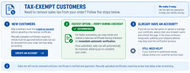
New Tax-Exempt Customers
If you are new to SOSCleanroom.com, the first step is to create an account.
Your account gives you access to the tax-exemption tools needed to submit and manage your certificate. Once your account has been created, you can proceed with submitting your tax-exempt information.
Create an AccountThe Fastest Option: Submit a New Certificate During Checkout
If you are ready to place an order, the fastest option is to create and submit a new tax certificate during checkout.
The certificate information is submitted for automatic verification. Once successfully verified, sales tax is automatically removed from the order so you can continue through checkout.
Creating a new certificate during checkout can help avoid waiting for a manually uploaded certificate to be reviewed.
Uploading an Existing Tax-Exempt Certificate
Customers can also upload an existing tax-exempt certificate.
Some manually uploaded certificates require review before they can be approved. If your certificate requires manual review, sales tax cannot be removed from your order until the certificate has been approved.
Manual review may delay your ability to complete a tax-exempt order, so we recommend submitting your certificate ahead of time whenever possible.
Already Have an Account but Don't See the Tax-Exempt Option?
If you already have an SOSCleanroom.com account but don't see the option to upload or manage your tax certificate on the checkout page, try these steps:
- Clear your browser cache and refresh the page.
- If the option still does not appear, temporarily update your shipping address during checkout to help reset the verification process.
Plan Ahead for Tax-Exempt Orders
If you regularly purchase cleanroom supplies for a tax-exempt organization, setting up your certificate before your next order can save time at checkout.
Remember:
- New customers should create an account first.
- Creating a new certificate during checkout provides the fastest verification.
- Manually uploaded certificates may require review and approval.
- Sales tax cannot be removed until the certificate has been successfully verified and approved.
A Simple Tax-Exempt Ordering Process
1. Create or Sign In to Your Account
Your SOSCleanroom account gives you access to the tax-exempt certificate tools available during checkout.
2. Submit Your Certificate
Create a new certificate during checkout for the fastest verification, or upload an existing certificate for review.
3. Complete Your Order
Once your exemption has been verified and approved, eligible sales tax is removed so you can continue through checkout.
Need Help With a Tax-Exempt Order?
If you have questions about your tax-exempt status or need assistance placing an order, our team is available to help.
Call 800-443-7101 Email Sales